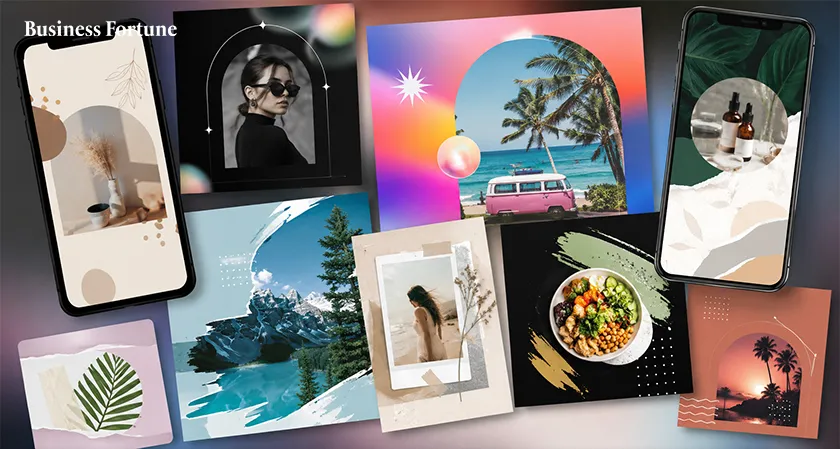
Creating a social media post doesn’t have to be hard. From Reels to TikTok, these best Adobe Express templates can make your next post a lot easier.
Scroll through Instagram, TikTok, YouTube, or LinkedIn and you’ll see great visuals are doing a lot of the talking. A sharp headline, a clean layout, or a quick animation can grab your attention. Making new and good looking content every day can be very exhausting. Not everyone has the time, skill, and patience to do so for each post, which is why the best Adobe Express templates help a person with ready-made template.
There will be no need to stare an empty screen and think where to start because everything would be done in just a few simple steps. Adobe Express offers a huge collection of customizable templates for social posts, videos, Instagram Stories and Reels, TikTok videos, YouTube thumbnails and more.
For creators, influencers, marketers, and businesses, it is pretty handy. So, Business Fortune features which template is worth checking out? Let's get into it.
10 Best Adobe Express Templates Trending on Social Media
Adobe Express has millions of templates available, which means that going through all of them could be similar to entering a massive stationary store and forgetting your purpose of visiting there. Also look for designs that match the way people are consuming content in 2026.
- Short-Form Video Templates
Short-form videos are quite common on social media platforms these days. Short videos from Reels, TikTok, and YouTube Shorts have become some of the simplest ways to catch attention and make content. Short-form video templates are the best choice if you want to make videos without wasting much time in editing.
These are perfect for making videos like Quick tips, Mini tutorials, Product list, Travel videos, Before and After video, Behind-the-scenes video, and Announcements.
- Instagram Reel Templates
The best Instagram Reel template will help in telling a story quickly. The reel works when it comes to almost any content you wish to convey without making the viewer go through a documentary film. Businesses may use reels for launch videos, customer stories, tips, how-to guides, event highlights, or even just behind-the-scenes glimpses.
Creators can use them to create travel videos, lesson videos, fashion videos, food videos, short vlogs, or the good old 'five things I wish I knew sooner’ posts. Cut out the long introduction part, make it sound interesting and get straight to it.
- TikTok Video Templates
When making these kinds of videos, people usually expect that they will be fast, informal and even a little rough. Obviously, you can’t transform your bedroom into a work studio and upload a 15 seconds clip on TikTok. By using TikTok templates, you can simply insert your videos, apply some text, use some transitions and get everything done within minutes. They work well for POVs, quick tips, product reviews, tutorials, travel videos, before and afters, "things I wish I knew" posts. The main thing is keep it quick.
- UGC-Style Product Templates
It’s easy for people to detect ads nowadays. When an image is too flawless and a caption too perfect, and all of that resembles a commercial on TV, people tend to simply scroll down. This is precisely why UGC style posts are working out great, they seem more genuine and authentic.
Adobe Express templates can help you create this kind of content using product photos, customer reviews, screenshots, short videos, and simple layouts. They work well for skincare, fashion, food, travel, apps, fitness products, home products, and everyday gadgets.
And whenever you can, use your own photos. A real photo taken on your phone often feels more convincing than a perfectly staged stock image of someone smiling at a salad they clearly have no intention of eating.
- Instagram Story Templates That Invite People In
Where you can be slightly more relaxed is in stories. There is no need for perfection or anything close to an advertisement. Rather than saying, "Here comes our new product," ask your followers, "Which one would you choose?" They now have something meaningful to do.
The interactive templates available for Instagram Stories are perfect for conducting polls, question and answers, quizzes, countdowns, product reveals, deals, or even those two-second questions that people can easily respond to. The best thing about them is that it is easy to make followers engaged using these templates.
And to be frank, tapping a poll is a lot easier than sitting there thinking of a clever comment.
- Carousel Templates for People Who Actually Want Information
Carousels are great when you have more to say than can fit into one post. You can break an idea into small, easy-to-read slides instead of throwing a giant paragraph at people.
For example:
Slide 1: 5 Instagram mistakes you might be making
Slide 2: Mistake #1
Slide 3: Here's what to do instead
Slide 4: Mistake #2
Slide 5: And keep going...
These graphic design templates work well for businesses, creators, marketers, educators, consultants, and pretty much anyone with useful things to share. They can also help with social search. People now use Instagram and TikTok to look for tips, ideas, products, recommendations, and answers.
- Product Launch and Social Commerce Templates
There’s not much difference between social media and shopping anymore. People see a product on Instagram or TikTok, watch some creators use it, check a few reviews in comments and start they're thinking, "Okay, where can I buy this?"
To create such promotional videos, this template helps. You can use them for new product launches, discounts, limited-time offers, seasonal sales, new collections, flash deals. Show the product first. Show how it works, why people might want it, or what makes it different.
- Big, Bold Typography Templates
Bold fonts, oversized headlines, and short, punchy lines are great for grabbing attention while people are scrolling.
Think:
STOP DOING THIS ON INSTAGRAM
3 THINGS I LEARNED AFTER STARTING MY BUSINESS
That's it. No complicated design. Just a strong headline doing the heavy lifting. These templates are great for sharing tips, opinions, announcements, quick advice, quotes, or anything you want people to notice. Just like that keep the words short.
- A little movement can make a post much more fun to watch.
The use of animated templates is perfect for Stories, Reels, TikToks, announcements, and promotions. You will easily be able to add moving texts, images, videos, and effects without having to learn how to do all this by yourself.
But be careful not to exaggerate. When your message is coming in too fast, your pictures are rotating, your stickers are bouncing off the screen, and your logo is performing gymnastic flips, you may have gone too far. The objective is to grab people’s attention, not make them reach for a motion sickness tablet.
- AI-Assisted Social Templates
And yes we have to talk about AI. It’s not that you cannot come up with the design, you’ll have a specific idea in your head but the only problem is that you can’t figure out how to recreate it.
That's where AI tools in Adobe Express can help. These templates may provide you with an idea for design and also help to create or modify visuals, thus saving your time. You can then customize everything adding your own photos, editing texts and colors until the result becomes yours. But let’s face it, nobody likes to have the same social feed as everybody else.
Use AI to save time. Then add enough of yourself to make people forget you used it.
How to Choose the Right Adobe Express Template
First, think about where you're posting. A TikTok video and a LinkedIn post obviously need very different looks.
Then, think about your brand. A serious financial company probably shouldn't use the same template as a meme account.
Make sure people can read it. A fancy font might look great, but if nobody can figure out what it says, what's the point?
And please, use a decent photo. Even the nicest template can't save a blurry product picture taken at 11 p.m. under your kitchen light.
Finally, make the template your own. Change the colors, fonts, photos, text, and graphics. Don't just pick a template and call it a day. A few small changes can make it feel much more like your brand.
How to Make Adobe Express Templates Look Less Like Templates
Not every post needs to shout, "LOOK AT ME!" Sometimes, keeping things simple works better. And honestly, the best part is that nothing gets in the way of your content. Just make sure you actually have something interesting to say. A pretty template can only do so much. It can't perform CPR on a boring post.
Short videos. Fast storytelling. UGC-style posts. Interactive Stories. Useful carousels. Bold typography. Minimal designs. Product content. Animation. AI-assisted creation. Adobe Express makes it easier to experiment with all of these formats without designing everything from scratch.
But here's the thing trending Adobe Express templates isn't the content. Your photos, your jokes, your opinions, your products, your weird little observations, your actual experience, that's what makes the post worth seeing. So use the template and then mess with it. Change the colors. Rewrite the headline. Throw in your own photo. Delete the unnecessary bits. Make it a little weird if that's your style.
FAQs
What is Adobe Express used for?
Adobe Express helps you create social media posts, videos, Stories, Reels, presentations, and other visual content using ready-made templates and simple editing tools.
Are Adobe Express templates free to use?
Yes, Adobe Express offers many free templates, although some premium templates and features require a paid plan.
Can I customize Adobe Express templates?
Yes. You can change the text, images, colors, fonts, graphics, and other elements to match your style or brand.
Which Adobe Express templates are best for social media?
Short-form video, Instagram Reel, TikTok, Story, carousel, product promotion, animated, and AI-assisted templates are useful choices for social media content.
How can I make an Adobe Express template look more original?
Replace the default images, rewrite the text, adjust the colors and fonts, and add your own photos or branding. Even a few changes can make a template feel much more personal.


.webp)


























Comments