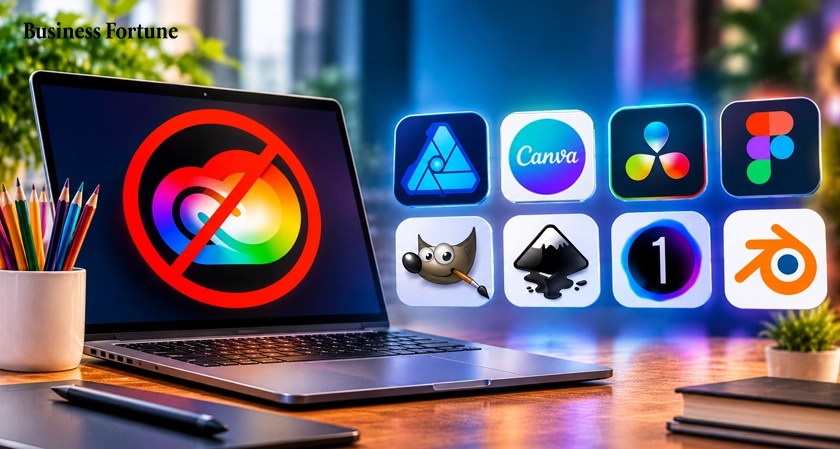
Looking for powerful creative tools without the high subscription costs? Explore the best Adobe Alternatives in 2026, compare their features, discover affordable options, and find the right software for your creative and business needs.
Adobe has long been a popular choice for designers, photographers, video editors, and businesses. Its creative tools offer many features, but not every professional needs an expensive software package to complete creative work. Several other platforms now offer powerful design, editing, and content creation features at different price points.
So, what are the options worth considering? In this Business Fortune article, we explore the Best Adobe Alternatives in 2026, including tools for graphic design, photo editing, video production, and team collaboration. We also look at their key features and explain which software may suit different business and professional needs.
Best Adobe alternatives in 2026
A single software package that can replace everything Adobe offers. Photoshop, Illustrator, InDesign, Premiere Pro, and Acrobat each serve different purposes. Therefore, choosing creative software alternative depends on the type of creative work a person or business handles.
Here are some of the leading options to consider in 2026.
1. Affinity
Affinity is professional design software and one of the best choices for individuals seeking alternatives to Adobe software. With its all-in-one application recently launched, Affinity offers everything from photo editing to vector design and page layout in one software package.
It is a great tool for working on brand identities, photograph editing, designing promotional materials, and publishing content. The photo editing capabilities offered by the platform include photo adjustments, retouching, and photo composition. The vector tools are ideal for designing logos and illustrations.
One major development in 2026 is that the new Affinity application is available free of charge. This makes it an interesting choice for freelancers, small businesses, and professional designers who want capable design software without another regular subscription.
2. Canva
Canva is one of the most appropriate tools for those organizations which often develop social media posts, presentations, ads, brochures, and other marketing content.
It offers users an easy-to-use editing environment through which it becomes possible to edit templates, pictures, fonts, graphics, and other design features without having any previous knowledge about design.
There are both free and premium versions of Canva. The paid version is where you find more features, although the application does not provide such a level of detail as other professional software programs do.
3. DaVinci Resolve
For those who spend most of their time working on videos, DaVinci Resolve is a good substitute for Adobe Premiere Pro.
Created by Blackmagic Design, the program integrates all video editing processes, color grading, visual effects, motion graphics, and audio post-production into one product. Therefore, it will be suitable for filmmakers, content creators, production companies, and business that produce videos as part of their marketing campaigns.
The free version of the product includes various editing possibilities, while the paid DaVinci Resolve Studio includes other professional options. Its color-related functions are especially useful for those who require more control over their video footage.
4. Figma
Figma is also professional design software made for interface design and the creation of digital products. This is particularly useful for UX/UI designers, web designers, product development teams, and companies building websites and mobile apps.
Since it operates on an online platform, it becomes very convenient for various members of the team to work together simultaneously. The tool enables users to create layouts, prototypes, components, and design systems.
Unlike graphic design software tools, Figma considers the user interaction aspect of the digital products. Hence, it would be an appropriate option for teams that need something more than just graphics.
5. GIMP
The GNU Image Manipulation Program, or GIMP, is an image editing software that is freely available. GIMP is a great program for those who need software to edit photos and manipulate images without having to subscribe.
This program allows you to use layers, masks, selections, filters, and various image formats, which makes it ideal for photo editing, image manipulation, digital art, and basic graphic design.
The GIMP software is compatible with major operating systems, including Windows, Mac, and Linux. Nonetheless, this program may be difficult to learn because of its interface and workflow. It is good for people who have little requirements for photo editing.
6. Inkscape
There is another alternative known as Inkscape that comes under the free and open-source software, which specializes in vector graphics. This is very useful in making logos, icons, drawings, diagrams, and other types of designs.
The program makes use of Scalable Vector Graphics (SVG) which enables users to scale the design without affecting the quality of the image. This feature proves useful while designing logos, graphics for websites, product illustrations, and printing purposes.
Although it does not include all the capabilities that the Adobe Illustrator package comes with, Inkscape has sufficient capability to undertake vector designs for everyday purposes.
7. Capture One
Capture One is an application developed to cater to professional photographers with a concentration on raw image manipulation, colour management, and photos management.
This application is particularly useful for photographers working with large collections of photographs or even studio photographs. The software provides high-quality image manipulation and color management.
Unlike general image editing software, Capture One gives more importance to photographic processes. This is why it is an ideal choice for commercial photographers, photographers’ studios, and professional photographers.
8. Blender
Blender is an open source and free creative software that targets 3D art creation and production. The software caters to 3D modeling, animation, rendering, visual effects and motion graphics.
Its versatile functionality makes it ideal for use in the creation of product visualization, animations, architectural visuals and digital arts. Although Blender is hard to learn, especially for beginners who are new to 3D modeling, it is highly recommended for professionals since it has many useful features that cannot be found in traditional 2D modeling programs.
Adobe Creative Cloud alternatives
The Adobe Creative Cloud provides various creative software packages in one subscription plan. However, all companies do not necessarily require each and every package that is available in the package deal.
Selecting separate applications can make it easy for the business to handle its software costs. However, the company must ensure the compatibility of files, collaboration capability, storage facility, and licensing requirements.
Graphic design software
Graphic design software helps professionals create visual content for different purposes, from business presentations and advertisements to logos, brochures and website graphics.
Affinity, Canva, GIMP, and Inkscape serve different parts of this market. Affinity offers a combination of photo, vector, and layout features. Canva focuses on accessible content creation, while GIMP and Inkscape provide free tools for image editing and vector artwork.
The correct decision is based on how complicated the process of designing will be. A marketing department creating standard advertising material can opt for something fast and based on templates, whereas a professional designer can require more freedom with layers, typography, colours, and design objects.
Adobe software competitors
Competition in the creative software industry is increasing because there is a growing number of professionals who prefer creative software not based on the subscription model. The developers of products like Canva and Blackmagic Design, together with developers of Affinity, Figma, and other open source programs, provide various solutions in terms of creative tasks.
These Digital design tools concentrate on making professional products affordable to a wider audience, while others have specific areas of expertise, such as video editing, photography, and digital product design. The competition allows companies to be more flexible in creating their own portfolio of software products.
Final Thoughts
It is important to have a more detailed look at the future needs while choosing business creative software and not just think about its price. It is necessary to evaluate how many users there will be, what kind of material they are going to create and whether it will be possible to edit it for other people.
Training is another important factor. Software that offers advanced features may not be the right choice if employees find it difficult to use. Similarly, a simple application may not support complex projects as the business grows.
It is practical to test a number of applications on actual projects to determine how well they work before changing to all of them at once.
FAQs
What are the best Adobe Alternatives in 2026?
Some of the leading options include Affinity for graphic design, Canva for marketing content, DaVinci Resolve for video editing, Figma for UI/UX design, GIMP for image editing, and Blender for 3D design. The best choice depends on the task.
Why choose alternatives to Adobe software?
Businesses and professionals may choose alternatives because of subscription costs, specific feature requirements, ease of use, or a preference for different licensing models. Some alternatives also offer free versions with useful professional features.
How should businesses choose the best Adobe alternative?
Businesses should compare the software's features, pricing, file compatibility, team collaboration options, operating system support, and learning requirements. Testing the application with actual projects can help them make a better decision.
Which Adobe alternative is best for professionals?
Affinity is a strong choice for professional graphic design, Capture One for photography, DaVinci Resolve for video production, and Figma for digital product design. Each serves a different professional workflow.
Can free software replace Adobe Creative Cloud?
Free applications such as Affinity, GIMP, Inkscape, Blender, and the free version of DaVinci Resolve can handle many creative tasks. However, they do not collectively reproduce every Adobe feature, service, or workflow. Businesses should check their requirements before switching.


.webp)





























Comments