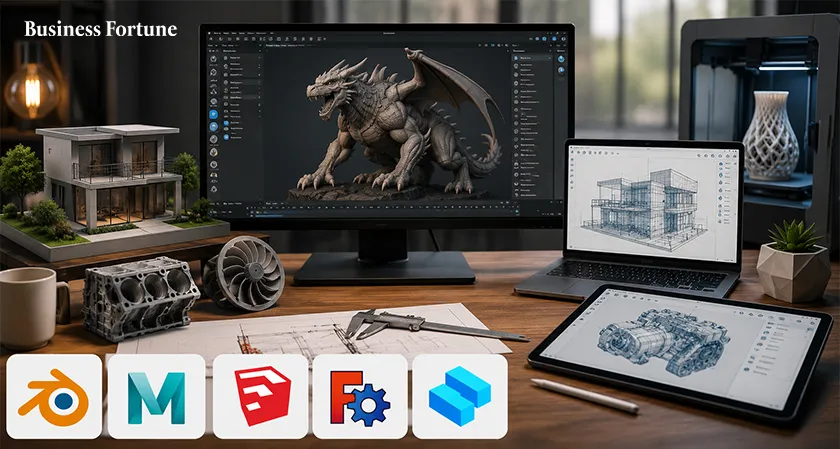
The Best 3D Modeling Software 2026 can turn a rough idea into a character, building, product or printable object. Explore five powerful options for beginners, designers, engineers and professionals.
The Best 3D Modeling Software 2026 does something almost magical; it lets you start with a blank screen and finish with something that looks like it could exist in the real world. A character can walk, a building can be explored from every angle, a machine can be tested digitally and a product can go from an idea to a manufacturing ready model; all without touching a physical prototype.
But there is a catch. The 3D world is crowded and choosing software can feel like walking into a giant toolbox where every tool claims to be indispensable. Some programs are built for animation, some for engineering, some for architecture and others for artistic sculpting. So which one deserves a place on your desktop? Let's take a tour through the five contenders and find out.
Why 3D Modeling Software Matters More Than Ever?
3D modeling is no longer something reserved for Hollywood studios or specialist engineering departments. It is used in game development, animation, architecture, product design, engineering, visual effects, education and 3D printing. That variety is exactly why there is no single perfect application.
Imagine three people sitting at three different desks. The first is designing a fantasy creature for a video game. The second is developing a mechanical component for a machine. The third is planning the interior of a new home.
All three are “doing 3D modeling.” Yet their ideal top 3D modeling software could be completely different. The trick is not to find the software with the longest feature list. It is to find the software that makes your particular kind of creating easier.
- Blender
If 3D design software had a Swiss Army knife, it might look a lot like Blender. For a student, Blender removes one of the biggest barriers to entry; price. You can begin learning without committing to an expensive subscription. For an experienced artist, meanwhile, its broad toolset means there is plenty of room to grow.
Blender is particularly attractive for artists, animators and game developers who want one application capable of handling multiple stages of production. You can model an object, texture it, animate it and render the final scene without constantly jumping between unrelated applications.
There is, however, a learning curve. Blender is powerful precisely because it does so much, and its interface can initially look like the cockpit of a small spacecraft. But once you get comfortable, that complexity starts making sense.
Best for: Beginners willing to learn, independent artists, animators, game developers and creators who want professional level capabilities without paying for the software.
- Autodesk Maya
If Blender is the versatile all rounder, Autodesk Maya is the veteran professional who has already spent years backstage at major productions.
Maya is designed for people who need detailed control over complex projects. Its advanced modeling and animation capabilities make it particularly suited to production environments where precision, repeatability and collaboration matter. That makes Maya one of the strongest choices among professional 3D modeling software for artists working toward film, television, games and other high end visual projects.
The downside is obvious; it is not necessarily the application you want if you simply want to experiment with 3D for a weekend. Beginners may find its extensive feature set intimidating. But if your goal is to work in a professional animation or VFX environment, learning Maya can be a serious investment in your creative toolkit.
Best for: Professional artists, animation teams, film and VFX production and game studios.
- SketchUp
Not every 3D project needs a spaceship, a dragon or a photorealistic explosion. Sometimes you just need to build a house. That is where SketchUp comes into its own.
The appeal is simplicity. Instead of making newcomers wrestle with an overwhelming collection of advanced controls, SketchUp allows them to start creating relatively quickly. That makes it particularly interesting for people who are more interested in what they want to design than in becoming experts in every aspect of 3D graphics.
Picture an interior designer planning a room. They can quickly construct walls, furniture and spaces, then view the design from different perspectives. A student can experiment with architectural ideas without first spending months learning an extremely technical workflow.
SketchUp may not be the first choice for a film animator creating a highly detailed creature, but that is not really its job. Its strength is making 3D feel approachable.
Best for: Beginners, architecture, interior design, conceptual modeling and hobby projects.
- FreeCAD
Now let's leave the world of animated characters and enter the workshop.
FreeCAD is an open source CAD application designed with engineering and manufacturing projects in mind. In artistic modeling, you might sculpt until a character simply “looks right.” In engineering, however, a model may need to be precisely 50 millimetres wide, contain a specific hole and fit against another component.
Precision is the star. FreeCAD is therefore particularly useful for engineers, makers and people working on 3D printing projects. Its open source nature also makes it attractive to users searching for capable, cost free tools.
For someone designing a mechanical part or preparing a model for fabrication, FreeCAD's parametric approach can be far more valuable than a flashy collection of animation effects.
Best for: Engineering, mechanical design, prototyping, makers and 3D printing.
- Shapr3D
The fifth choice, Shapr3D, takes a slightly different route.
Traditional CAD software can sometimes feel as though it was designed by engineers for engineers and perhaps for machines that engineers assume will never leave the office. Shapr3D takes a more modern approach. Product designers and engineering professionals can work on concepts without necessarily being tied to a conventional desktop only workflow.
For someone sketching a product idea at a desk, then refining it elsewhere, that flexibility can be a major advantage. It sits comfortably between accessibility and professional capability, making it one of the more interesting options for product focused design.
Best for: Product designers, engineers, professionals who want mobility and users looking for a modern CAD experience.
How to Choose the Right 3D Modeling Program
Choosing between the leading 3D modeling programs starts with one deceptively simple question:
What are you trying to make? If the answer is “a character for my first animation,” Blender could be a strong starting point. If it is “a professional character for a major production,” Maya deserves serious consideration. Want to design a house? Look at SketchUp. Want to manufacture a mechanical component? FreeCAD or Shapr3D may make more sense.
Budget matters too. Blender and FreeCAD are free, while the other options may involve paid plans or limitations depending on the version and use case.
And don't forget your computer. Your Computer can make or break the experience even brilliant software cannot perform miracles on unsuitable hardware.
A Pen Can Change the Way You Model
There is another piece of the puzzle that is easy to overlook; how you interact with the model.
A mouse is perfectly capable of navigating many 3D applications, but sculpting and texture work can feel more natural with a pressure sensitive pen display.
For artists who spend hours shaping digital characters, that difference can become surprisingly noticeable. It is the difference between telling your computer, “Move this point exactly here,” and feeling more as though you are physically shaping the surface.
Don't Choose Software Based on Screenshots
A common mistake is choosing a program because its promotional images look spectacular. Of course they do.
Software companies are very good at making digital worlds look irresistible. But a beautiful final render does not tell you whether the application is comfortable for your workflow. Before committing, consider the interface, tutorials, community support, hardware requirements, file compatibility and the kinds of projects you actually want to create.
A beginner who chooses an extremely sophisticated program may spend more time learning the interface than creating. Meanwhile, a professional who chooses an overly simple tool may quickly run into limitations.
The right software should challenge you but not constantly fight you.
Learning Beats Collecting Tools
There is an amusing trap in the 3D world; downloading software can feel like progress. It isn't.
You can install five applications and still have no idea how to model a chair. The real progress comes from choosing one tool and using it repeatedly. Build something simple. Break it. Fix it. Build it again. Try a more complicated object. Learn shortcuts. Experiment with lighting. Render it. Then start over. That process teaches skills that transfer across applications. Once you understand topology, modeling principles, materials, lighting and spatial thinking, changing software becomes much easier.
Where 3D Modeling Is Heading
The future of 3D design is likely to become even more connected to real time visualization, digital manufacturing, games, virtual environments and interactive product development. That means today's learner could eventually use the same core skills in several industries.
A model created for a game might become part of a virtual experience. A product prototype could be reviewed digitally before manufacturing. An architectural design could be explored before construction begins.
The boundary between “designer,” “artist,” “engineer” and “developer” is becoming increasingly flexible. That makes learning 3D modeling more than learning a piece of software. It is learning a new way of thinking about objects and spaces.
Business Fortune believes that the Best 3D Modeling Software 2026 depends less on which application has the biggest reputation and more on what you want to create.
Blender stands out as the versatile free powerhouse. Maya remains a compelling choice for professional animation and visual effects. SketchUp makes the first steps into 3D considerably less intimidating. FreeCAD brings precision to engineering and 3D printing, while Shapr3D offers a modern, portable approach to product and CAD design.
The most important decision, however, is not which icon you download first. It is what you do after opening it. Pick a project. Start small. Learn the tools. Make something ugly. Improve it. Then make something better. Because in 3D, the most exciting moment is not when you find the perfect software. It is when the object on your screen finally starts looking like the idea that was in your head.
FAQs
What Are the Top 5 3D Modeling Software in 2026?
The top five highlighted in the guide are Blender, Autodesk Maya, SketchUp, FreeCAD and Shapr3D.
Which 3D modeling software is best for beginners?
SketchUp is highlighted as the beginner friendly option because of its simple interface and relatively easy learning process. Shapr3D is another approachable choice, particularly for product and CAD design.
Which software is best for professional 3D animation?
Autodesk Maya is a strong choice for professional animation, character creation and visual effects.
What is the best free 3D modeling software?
Blender and FreeCAD are the strongest free options in this selection. Blender is particularly versatile for artistic and animation projects, while FreeCAD is aimed more toward engineering, manufacturing and 3D printing.
How much RAM do I need for 3D modeling?
For basic learning and smaller projects, 16GB can be sufficient.


.webp)






























Comments