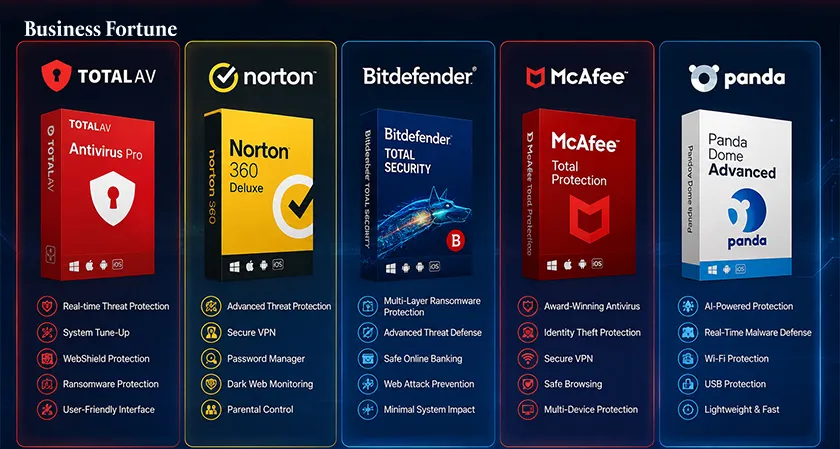
The best antivirus software in 2026 is no longer just about catching viruses. Today's security suites fight ransomware, phishing, spyware, malicious websites and other digital threats while adding useful tools such as VPNs, password managers and identity protection.
Finding the best antivirus software in 2026 can feel a little like choosing a bodyguard. Every company promises to keep the bad guys away, but what happens when a suspicious download appears, a phishing link lands in your inbox or ransomware tries to lock your files? That is where the differences between security products become important.
Modern antivirus programs have evolved far beyond the simple virus scanners of the past. Leading products now combine malware detection with real time web protection, ransomware defenses, phishing protection, privacy tools and in some cases, VPNs and password managers.
Independent testing also shows that there is no single product that wins every category. So, instead of simply asking which antivirus has the biggest name, let's look at five products that stand out for different types of users.
- TotalAV
If you want security without feeling like you need a cybersecurity degree to operate the software, TotalAV is an appealing choice. Its biggest strength is simplicity. The interface is designed to make common tasks such as running scans, checking threats and reviewing protection settings relatively straightforward. TotalAV also provides real time protection, anti phishing tools and additional privacy and optimization features.
Independent testing has found strong malware and phishing protection, although results have not been perfect across every category. That makes TotalAV particularly interesting for users who want a straightforward security package rather than a collection of complicated controls.
Best for: Beginners and users who prioritize ease of use.
Watch out for: Renewal pricing and aggressive upgrade prompts.
- Norton
Norton remains one of the most recognizable names in cybersecurity and there is a reason it continues appearing near the top of modern antivirus comparisons. Norton's appeal is its broad security ecosystem. Depending on the plan, users can get malware protection alongside features such as a VPN, password management, parental controls, cloud backup and identity related monitoring.
Norton is therefore a strong option for households that want more than basic malware scanning. It can act as a central security package rather than requiring users to assemble several separate tools.
Best for: Families and users wanting an all in one security suite.
Watch out for: Renewal prices and optional add ons.
- Bitdefender
Bitdefender has long been a favorite among security enthusiasts and it remains one of the most compelling options in 2026. Its reputation comes largely from strong malware detection and a wide range of security controls. Depending on the package, users can get ransomware protection, web security, firewall features, parental controls, password management and VPN access.
The software also offers different subscription levels, meaning users can choose between basic malware protection and a more comprehensive security suite. The tradeoff is that some advanced features are reserved for higher tier plans. Performance impact can also vary depending on the system and the features being used.
Best for: Users who put malware protection and advanced security features first.
Watch out for: The number of features can feel overwhelming for beginners.
- McAfee
A household with a laptop, desktop, phones, tablets and other connected devices can quickly turn antivirus shopping into a mathematical problem. That is where McAfee becomes interesting.
Its security packages are designed around protecting multiple devices, making the brand particularly relevant to families and people with several personal devices. Its broader security offerings can include malware protection, web security, identity monitoring and other privacy focused tools. The major attraction is convenience. Instead of managing separate subscriptions for every device, users can choose a plan designed around multiple devices.
This can also be useful for families where not everyone is equally comfortable managing security software. A centralized subscription makes it easier to maintain protection across a collection of devices.
McAfee is not necessarily the cheapest option for every individual user, but its value can improve considerably when several devices need coverage.
Best for: Families and users with multiple devices.
Watch out for: Compare the number of covered devices and renewal price before purchasing.
- Panda
Panda is another name worth considering if you want an alternative to the biggest antivirus brands. Its security products are built around malware protection while also offering additional privacy and security tools depending on the plan. The brand is particularly interesting for users who want a choice between simpler antivirus protection and broader security packages.
The wider antivirus market has become highly competitive, with products increasingly adding VPNs, password managers, identity protection and system optimization tools. That means choosing software based purely on the number of features can be misleading.
The better question is: Which features will you actually use?
Panda can make sense for users who want a flexible security package and are willing to compare plans before committing.
Best for: Users looking for a flexible alternative with additional security tools.
Watch out for: Make sure the plan you choose includes the features you actually need.
What Makes the Top Antivirus Software Different?
At first glance, antivirus products can look almost identical. They all advertise malware protection, safe browsing and real time security. The real differences appear when you dig deeper.
Malware Detection
This is still the foundation. A good antivirus should identify malicious files, suspicious programs and other threats before they cause damage. Independent testing matters here because marketing claims do not tell the whole story.
Ransomware Protection
Ransomware can be particularly devastating because it can prevent users from accessing their own files. Modern security suites therefore attempt to identify suspicious behavior before files are encrypted. Some premium products also offer additional recovery or backup features.
Phishing Protection
Not every cyberattack requires sophisticated malware. Sometimes, the attacker simply needs you to click the wrong link. Phishing protection attempts to identify malicious websites and deceptive pages before you enter sensitive information such as passwords or payment details.
Performance
Nobody wants an antivirus program that protects a computer by making it painfully slow. Modern products generally aim to work quietly in the background, but system impact varies. Reviews and independent tests therefore consider performance alongside protection rather than treating detection as the only measurement.
Extra Features
VPNs, password managers, parental controls, identity monitoring and cloud backup can make premium security suites attractive. But more features do not automatically mean better security. If you already use a dedicated password manager and VPN, paying extra for duplicate tools may not make sense.
The right choice depends on how you use your PC, which will help you pick a good antivirus for PC.
Someone who mainly browses trusted websites and downloads very little may have different needs from someone who regularly handles sensitive work files, installs third party software or manages multiple household devices.
Antivirus Software 2026: Free or Paid?
This is one of the biggest questions buyers face.
Free antivirus can be perfectly reasonable for basic protection, particularly when combined with built in operating system security. But paid products typically add layers such as ransomware protection, VPNs, identity monitoring, parental controls, password managers and customer support.
The key is not to pay simply because something is labeled "premium." Ask yourself what problem you are actually trying to solve. If you need only malware protection, a basic product may be enough. If you want one subscription to protect an entire family and provide privacy tools, a premium suite may offer better value.
A Quick Reality Check Before You Buy
There is one part of antivirus shopping that deserves more attention: renewal pricing. A subscription can look extremely cheap during its introductory period and become considerably more expensive when it renews.
Always check:
-
The first year price
-
The renewal price
-
Number of supported devices
-
Supported operating systems
-
Included features
-
VPN data limits
-
Money back guarantee
-
Automatic renewal settings
Also remember that running two full antivirus programs simultaneously is usually not a good idea. Security products can interfere with each other, consume additional system resources and create confusing alerts.
The Best Antivirus Isn't Always the Most Expensive
The best antivirus 2026 choice depends on the person sitting behind the keyboard. A gamer may care about performance. A parent may prioritize parental controls. A remote worker may want strong phishing protection. A family may care most about multi device coverage. Someone with a Mac may want reliable macOS support rather than a Windows heavy feature list.
That is why our five picks have different strengths. TotalAV stands out for simplicity. Norton offers a broad security ecosystem. Bitdefender is compelling for advanced malware protection. McAfee makes sense for multi device households, while Panda offers another flexible option.
Best Antivirus Software for Windows 11
For people specifically searching for the best antivirus for Windows 11, the good news is that Windows already includes Microsoft Defender through Windows Security. That does not mean third party antivirus is useless. Independent comparisons continue to evaluate additional products for stronger protection, extra privacy tools and broader security features
Extra Tips to Stay Safer Online
Even the strongest security software cannot completely replace good digital habits. Keep your operating system and applications updated. Use unique passwords and enable multi factor authentication wherever possible. Be suspicious of unexpected attachments and links even when they appear to come from someone you know.
Back up important files regularly. A backup stored separately from your computer can be invaluable if ransomware or hardware failure strikes. And perhaps most importantly, slow down.
Many successful cyberattacks depend on urgency: Your account will be closed today. Click now. Your payment failed. Verify immediately. You have won a prize. The safest response is often the simplest one: stop, check and think before clicking.
The world of antivirus software has changed dramatically. Today's products are no longer simply digital vacuum cleaners that hunt for viruses hiding on your hard drive. They are broader security platforms designed to protect users from malware, ransomware, phishing, unsafe websites and increasingly sophisticated online scams. There is no universal winner for every user.
Business Fortune believes that the smartest choice is the one that matches your devices, habits, budget and actual security needs.
FAQs
What is the best antivirus software in 2026?
There is no single winner for everyone. Norton, Bitdefender, TotalAV, McAfee and Panda are strong options with each offering different strengths.
Do I need antivirus software on Windows 11?
Windows 11 includes Microsoft Defender, which provides built in protection. Some users may still prefer third-party software for additional security features and broader protection.
Is antivirus necessary on a Mac?
Macs have built in security features, but they are not immune to malware, phishing and other threats. Additional antivirus protection can provide another layer of security.
Is free antivirus good enough?
Free antivirus can provide useful basic protection. Paid suites generally add more features, such as ransomware defenses, VPNs, identity monitoring and parental controls.
Should I install two antivirus programs?
Generally, no. Running multiple full antivirus products at the same time can cause conflicts and unnecessary system overhead. Choose one primary real time antivirus solution instead.


.webp)































Comments