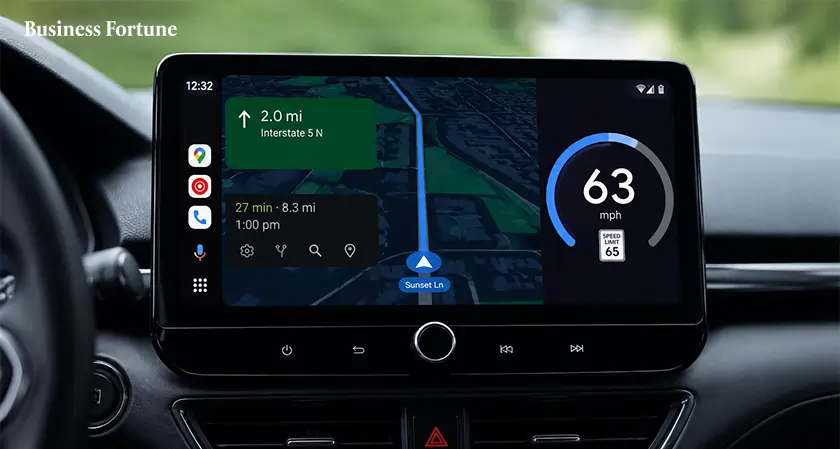
Google Maps speedometer feature has appeared on Android Auto after years of requests. Here's what it does and why drivers are excited.
After years of requests from Android Auto users, Google has finally begun to add the Google Maps speedometer feature, allowing drivers to view their real-time speed directly on their car's infotainment screen. If you've ever wished your navigation screen could show your driving speed without having to glance at the dashboard, Google Maps speedometer feature will help. The update is currently reaching a limited number of beta users and could soon become one of the most useful additions to Google Maps for drivers.
While Google Maps has offered a speedometer on smartphones for quite some time, and Apple CarPlay received similar functionality in 2024, Android Auto users have been left waiting. That wait now appears to be coming to an end.
A Small Update Brings Big Change
The rollout was first spotted by Android Auto beta testers, including a user in Canada running Google Maps beta version 26.29.02.946673643. Although the feature is currently available only to a limited number of users, it signals that Google is preparing for a wider release.
The speedometer displays real-time vehicle speed directly within Google Maps. When navigation is active, drivers can also see the speed limit for the road they are traveling on. Without active navigation, the display shows only the current speed. This allows drivers to keep an eye on their speed while following directions, all from a single screen.
Why Has It Taken So Long?
Many Android Auto users have wondered why the feature arrived much later than on other platforms. Waze, Google's own navigation app, has offered a built-in speedometer for years, making the absence of the feature on Android Auto even more noticeable.
“The best technology is the technology that disappears into everyday life,” said Satya Nadella, Chairman and CEO of Microsoft. The arrival of the Google Maps speedometer feature reflects this idea by giving drivers important information without adding complexity to the driving experience.
The new speedometer works in both full-screen navigation mode and Android Auto's Coolwalk multi-pane layout, making it easy to access while using other features.
Can You Get the Feature Right Now?
The answer depends on your account. Google is rolling out the feature gradually through a server-side update, meaning even users with the latest beta versions may not see it immediately. Users can improve their chances by updating Android Auto and Google Maps to the latest versions, but availability ultimately depends on Google's rollout schedule.
More Driving Features Are on the Way
The introduction of the speedometer highlights Google's ongoing efforts to make navigation smarter and more useful inside vehicles. As Business Fortune observes, Android Auto continues to evolve with more connected and driver-friendly tools, hence features like this could become standard across all supported cars. If testing goes smoothly, a broader public release of the speedometer feature could arrive in the coming weeks, making everyday navigation simpler and more convenient for millions of drivers.
FAQs
What is the Google Maps speedometer feature?
It is a tool that displays your vehicle's real-time speed directly within Google Maps on Android Auto.
Is the feature available to all Android Auto users?
No. It is currently rolling out to a limited number of beta users and has not yet been released widely.
Does the speedometer show speed limits too?
Yes. When navigation is active, the feature can display both your current speed and the road's speed limit.
How can I enable the speedometer on Android Auto?
Update Android Auto and Google Maps to the latest versions. If Google has enabled the feature for your account, it should appear automatically.
Why is this feature important for drivers?
It helps drivers monitor their speed more conveniently on the navigation screen, reducing the need to look away from directions or check the dashboard frequently.


.webp)






























Comments